
What Is an MCP Server? A Plain-English Guide with Examples
An MCP server lets Claude, ChatGPT and other AI assistants use outside tools and data. See how it works, whether it is safe, and real examples.
Blog · October 27, 2026
TL;DR: What is an MCP server? It is a small service that gives an AI assistant access to one outside tool or data source. MCP (Model Context Protocol) is the open standard that makes this work the same way in Claude, ChatGPT and other apps. You add the server once, then ask questions in plain words, and the assistant calls the server when it needs data.
Example: with a Search Console MCP server, you can ask “which pages lost clicks this month?” and get live numbers back in the chat.
This guide explains what MCP is in plain words, with no code. You will see how an MCP server works, real examples, how it compares to an API, what to check before you trust one, and whether you need one at all.
What MCP stands for and why it exists
MCP stands for Model Context Protocol. It is one standard plug that lets AI apps connect to many tools. The official MCP site compares it to a USB-C port: one shape that fits many devices.
Before MCP, every AI app needed its own custom link to every tool. A tool maker who wanted to work with three assistants had to build three integrations. Anthropic named this problem when it introduced MCP in November 2024: “Every new data source requires its own custom implementation”.
With MCP, a tool maker builds one MCP server, and any app that speaks MCP can use it. In December 2025 Anthropic gave MCP to the Agentic AI Foundation at the Linux Foundation, so no single company owns it.
How an MCP server works
An MCP server works as a middleman. Your assistant asks it for data, it gets the data from the real tool, and it hands the result back. The MCP architecture docs name three parts:
- Host: the AI app you use, like Claude or ChatGPT.
- Client: a small connector inside the host. It keeps one connection open to one server.
- Server: the service that offers tools, like “list my sites” or “get clicks by page”.
Here is what happens when you ask a question:
- You ask in plain words, for example “Which pages get many impressions but few clicks?”
- The assistant picks a tool. It sees the list of tools the server offers and chooses the one that fits.
- The server fetches the data from the real source, like Google Search Console.
- The assistant answers with the numbers, in a table or a short summary.
You do not pick the tool yourself. The assistant reads each tool’s name and description and decides when to use it. That is why clear questions get better answers.
Local vs remote MCP servers
There are two kinds of MCP servers. A local server runs on your own computer. A remote server runs on the internet, and you add it with a URL.
| Local MCP server | Remote MCP server | |
|---|---|---|
| Where it runs | On your computer | On the provider’s server |
| How you add it | Install it, often with a terminal command | Paste a URL, then sign in |
| Good for | Your files, local code, tools on your machine | Online services, use on many devices |
| Who it fits | Developers and people at ease with a terminal | Anyone, including non-developers |
The MCP docs explain both: connect to local servers and connect to remote servers. If you are not a developer, a remote server is usually the easier start.
MCP server examples
MCP servers exist for many kinds of jobs. Anthropic’s launch post listed ready-made servers for Google Drive, Slack, GitHub, Git and Postgres. Grouped by job, the common kinds are:
- Files: read and search documents on your computer or in cloud storage.
- Code: read repos, issues and pull requests.
- Docs and notes: search your team wiki or notes app.
- Chat and email: find past messages and threads.
- Databases: ask questions about your own tables in plain words.
- Search and analytics data: read clicks, impressions and visits for your website.
A worked example: a Search Console MCP server
Say you run a website and check Google Search Console by hand each week. A Search Console MCP server lets your assistant read that data for you.
Rankvisit is one such server. It is a hosted, read-only Google Search Console MCP server for Claude, ChatGPT, Grok, Claude Code and Codex. You sign in with Google, add one URL (https://rankvisit.com/mcp) to your assistant, and that is it. No code. If you use Fathom Analytics or Simple Analytics, you can connect it too, so the assistant sees real visits next to Google clicks.
Then you ask questions like these:
- “Look at the top 100 queries for example.com/blog in the last 28 days. Which of them rank on page 2?”
- “Of the top 50 pages on example.com, which get many Google impressions but few clicks in the last 28 days?”
- “Which 10 pages in example.com/blog lost the most Google clicks this month compared to last month?”
Name the site, the period and a page, folder or number of queries. Then the assistant loads less data and answers faster.
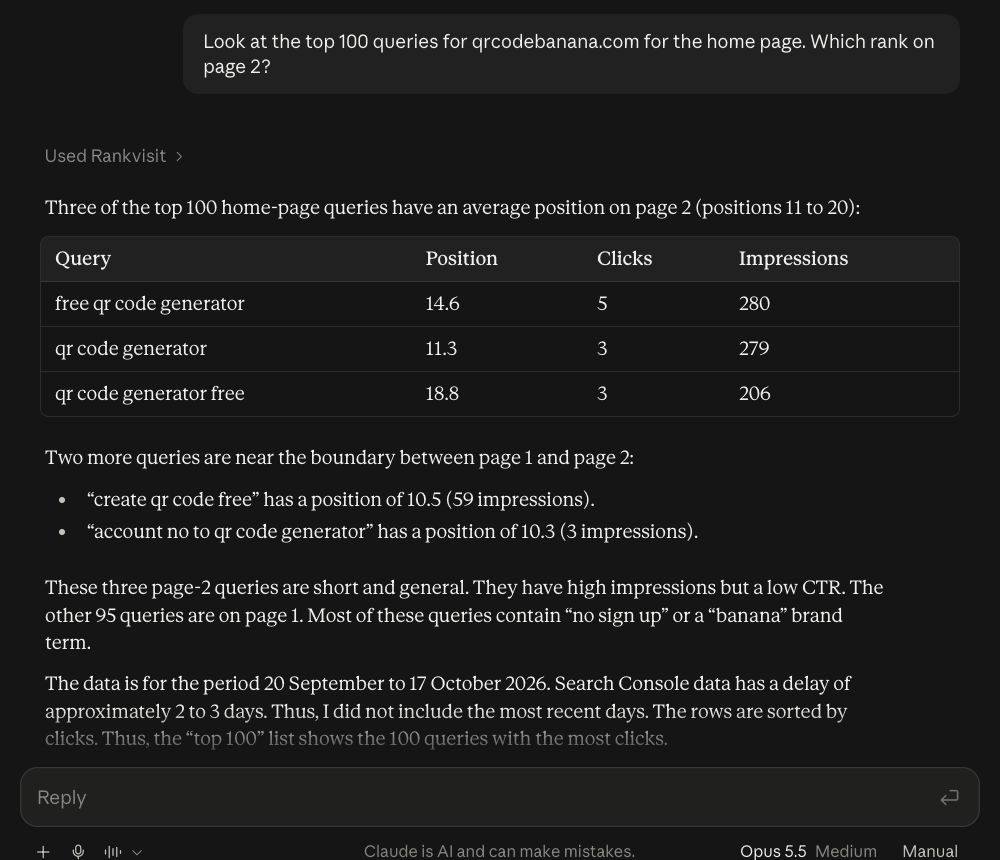
Below is a real answer in Claude.ai for qrcodebanana.com, one of our own sites. We asked which of the top 100 home page queries rank on page 2. Claude called Rankvisit once and answered with a table:
MCP server vs API
An API is built for programs. An MCP server is built so an AI assistant can find and use tools on its own. Many MCP servers call an API in the background and wrap it in a form the assistant understands.
| API | MCP server | |
|---|---|---|
| Built for | Programs and developers | AI assistants |
| How it is used | A developer writes code for each call | The assistant picks and calls tools itself |
| Describes itself | In docs that people read | In tool names and descriptions the assistant reads |
| Works with | The one app it was coded for | Any app that supports MCP |
| You need code | Yes | No, for a remote server |
So MCP does not replace APIs. It sits on top of them and makes them usable from a chat.
Are MCP servers safe?
MCP servers can be safe, but each one is only as safe as the people who run it and the access you give it. An MCP server can read data and, for some servers, change or delete it. Check these four things before you add one:
- What can it do? Read-only servers can only look. Others can also write, send or delete. Your assistant may ask you before it runs a tool, but read-only is the safer start.
- What access does it ask for? When you sign in, the login screen lists what you allow. Grant only what the server needs.
- Who runs it? A remote server runs on someone else’s machine. Use servers from companies or people you trust, with a clear privacy policy.
- Does it keep your data? Some servers store copies. Others only pass data through.
For example, Rankvisit is read-only. It cannot change anything in Search Console, and it does not store copies of your search or analytics data. Each answer reads fresh data from Google.
The MCP project also lists security best practices, mostly for people who build servers.
Do you need an MCP server?
You need an MCP server if you want your assistant to work with data that lives somewhere else. You do not need one if you only chat, write or brainstorm.
An MCP server is worth it if:
- you copy data from a tool into the chat over and over,
- you ask the same questions about your numbers every week,
- you want answers from live data, not from a file you exported last month.
You can skip it if:
- you mostly use your assistant to write text or get ideas,
- the data you need fits in one file you can upload,
- you do not trust any server for the tool you use yet.
Not ready to connect an assistant? The free Search Console analyzer finds low-CTR pages and page 2 queries from a Search Console export, right in your browser.
How to add an MCP server to your assistant
Adding a remote MCP server takes a few minutes in most assistants:
- Claude: add it as a custom connector. The steps, with screenshots, are in our guide on how to connect Google Search Console to Claude.
- ChatGPT: OpenAI’s docs show how to add a custom MCP server in ChatGPT. Your account and workspace settings decide whether you can add one.
- Claude Code: run one
claude mcp addcommand in your terminal. The Claude guide above covers it too.
The Rankvisit docs have setup steps for each supported assistant.
Next step
Pick one tool you check by hand every week. Find an MCP server for it that you trust, add it to your assistant, and ask one narrow question about your own data. If that tool is Google Search Console, you can start with Rankvisit’s free questions.
FAQ
What is the difference between an API and an MCP server?
An API is built for programs. A developer reads its docs and writes code to call it. An MCP server describes its tools in a standard way, so an AI assistant can see them, pick the right one and call it on its own. Many MCP servers use an API in the background.
Does ChatGPT use MCP?
Yes. OpenAI's docs show how to add a custom MCP server in ChatGPT by its URL. Your account and, for work accounts, your workspace settings decide whether you can add one.
Do I need an MCP server?
Only if you want your assistant to work with data or tools outside the chat, like your files, your code or your Search Console numbers. If you only chat, write or brainstorm, you do not need one.
Are MCP servers safe?
They can be, but you have to check each one. Look at what it can do (read only, or also write and delete), what access it asks for when you sign in, who runs it, and whether it keeps copies of your data. Only add servers from people or companies you trust.
What does MCP stand for?
MCP stands for Model Context Protocol. It is an open standard for how AI apps connect to outside tools and data. Anthropic released it in November 2024.