
Claude Custom Connectors: How to Add Any MCP Server
Add any remote MCP server to Claude as a custom connector. Steps for web and desktop, which plans allow it, and fixes for when it fails to connect.
Blog · November 9, 2026
TL;DR: A custom connector adds any remote MCP server to Claude. Add it under Customize, then Connectors, with the server’s URL. Free plans get one, and on Team and Enterprise plans an Owner adds it.
Claude custom connectors let Claude use any remote MCP server, not only the ones in Anthropic’s directory. In Claude, open Customize, then Connectors, and click “Add custom connector”. Give it a name and paste the server’s URL. Then click Connect and sign in if the server asks you to.
You add the connector once, and it is saved to your Claude account. It works in Claude on the web and in the desktop app. New to the term? Read what an MCP server is first.
Custom connector vs directory connector
A directory connector is listed in Anthropic’s Connectors Directory, so you can find it and install it from there. A custom connector is one you add yourself with a URL. Both use the same technology. The difference is how you find them and how much Anthropic has checked them.
| Directory connector | Custom connector | |
|---|---|---|
| How you add it | Pick it in the directory | Paste the server’s URL |
| Label in Claude | Verified or Community | Custom |
| Anthropic’s review | Verified: tested. Community: screened, not reviewed in depth | None |
Even the Verified label is not a security audit, as Anthropic’s page on connector verification says. The company that runs a connector controls its tools and can change them later.
If you have a connector’s URL, you can add it as a custom connector, even if it is also in the directory. Rankvisit is an example of both. You can install it from its page in the Connectors Directory, or add https://rankvisit.com/mcp as a custom connector. The steps below work for any remote MCP server.
How to add an MCP server to Claude
These steps are for Free, Pro, Max and Ultra plans. They come from Anthropic’s guide to custom connectors, checked on 2026-11-09. On a Team or Enterprise plan, see the note after the steps.
1. Find the server’s URL
Look in the docs of the service you want to connect. You need the HTTPS address where the server accepts MCP requests, for example https://mcp.example.com/mcp. The normal home page of the service will not work.
2. Open your connectors
In Claude, go to Customize, then Connectors. Older versions of Claude showed this page under Settings.
3. Start a new custom connector
Click + Add at the top right, then Add custom connector. A dialog opens.
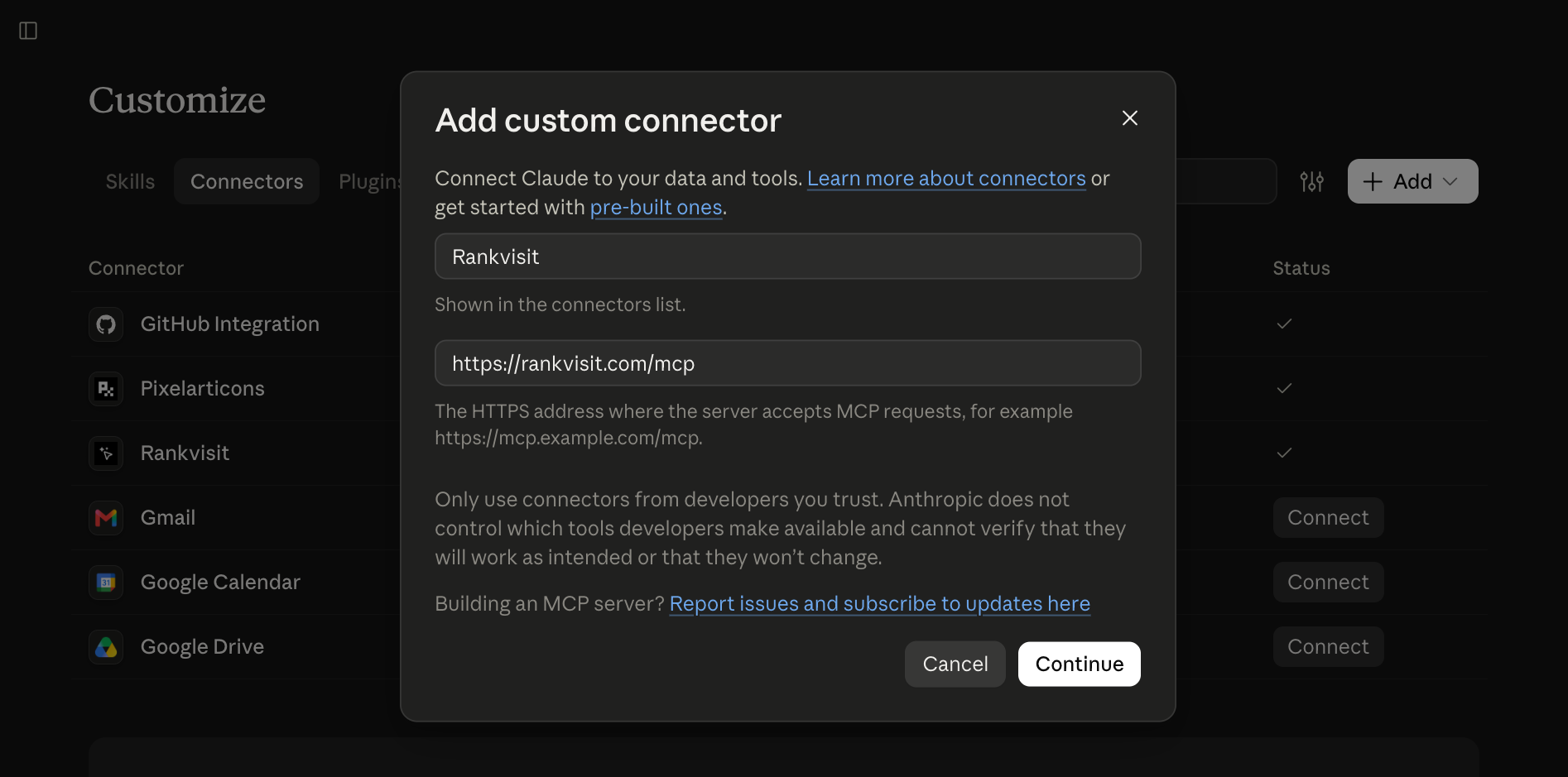
4. Enter a name and the URL
Type a name. This is the name you will see in your connectors list. Paste the URL and click Continue. Here is the dialog with Rankvisit as the example:
5. Check the sign-in settings
Claude shows the sign-in settings it found for the server. Keep them unless the server’s docs say something else, and click Continue. Then click Add. Anthropic says the layout of this dialog can differ between organizations, so you may see these fields on one screen.
6. Click Connect and sign in
Click Connect next to your new connector. Sign in to the service and review what it asks to access. When you are done, the connector shows as connected.
On a Team or Enterprise plan
Members can’t add a custom connector on their own. An Owner or Primary Owner adds it once under Organization settings, then Connectors: click Add, hover over Custom, and select Web. On Enterprise, a custom role that can manage libraries can do this too.
After that, each member goes to Customize, then Connectors, finds the connector and clicks Connect. Everyone signs in with their own account, so Claude only sees what that person can see. The exception is a connector that uses a shared credential, such as an API key.
Turn it on in a chat
You choose which connectors Claude can use in each chat. Click the + button at the bottom left of the chat box, select Connectors, and use the toggles.
Want more control? Go to Customize, then Connectors, select the connector, and set a tool’s permission to Blocked. Claude also asks before it uses some tools. Only click Always allow for tools you trust to run without you watching.
Which plans can use Claude custom connectors
All of them, with limits. Anthropic says custom connectors work on the Free, Pro, Max, Ultra, Team and Enterprise plans (checked 2026-11-09).
| Plan | Who adds it | Limit |
|---|---|---|
| Free | You | One custom connector |
| Pro, Max, Ultra | You | Anthropic names no limit |
| Team, Enterprise | An Owner (see above) | Members connect with their own account |
Local MCP servers in Claude Desktop
A custom connector is for remote servers. A local server runs on your own computer, and that is a separate setup. It works only in Claude Desktop, and not in Claude on the web.
You have two options. A desktop extension is a .mcpb file that you install in the app’s settings. You can also edit the claude_desktop_config.json file, as shown in the MCP docs for local servers.
Which one do you need? If the server has a URL, use a custom connector. If it needs files or tools on your computer, go local.
Example: Search Console data in Claude
Rankvisit is a read-only Google Search Console MCP server, so it makes a good first test. Once it is connected, you can ask about your site in plain words. Try these:
Look at the top 100 queries for example.com/blog in the last 28 days. Which of them rank on page 2?
Of the top 50 pages on example.com in the last 28 days, which have the lowest CTR?
Compare Google clicks for example.com/pricing in the last 28 days with the 28 days before.
Each question names a site, a period and a page or a number of rows. That way Claude loads less data and answers faster.
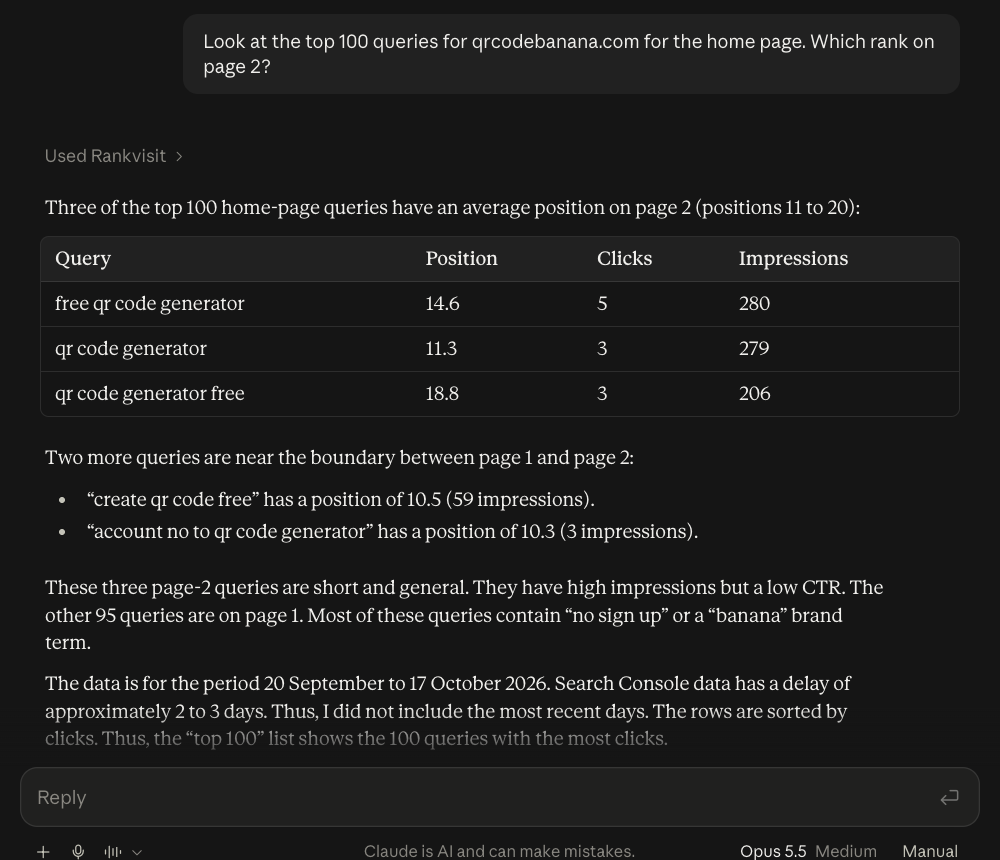
Here is a real answer in Claude.ai for qrcodebanana.com, one of our own sites. Claude used Rankvisit once and returned a table of the page 2 queries:
For the full walkthrough, see how to connect Google Search Console to Claude. Using another assistant? We also show how to add an MCP server to ChatGPT.
When a custom connector fails
Failures often come down to the URL, the network or the sign-in settings. Start with the problem that matches yours.
The connection fails, but the server works for you. Claude reaches your server from Anthropic’s cloud, not from your computer. This is true in the desktop app too. A server behind a VPN or firewall won’t connect. It must be open to the public internet, or you need to allow Anthropic’s IP addresses in your firewall.
The URL is wrong. Use the exact MCP address from the server’s docs, not its home page. Claude also reads the end of the URL: one that ends in /sse selects the older SSE transport. Change the Transport setting under Advanced only if the server’s docs tell you to.
Sign-in fails. Your server may not support the sign-in method you picked. Under OAuth client, the option “Use Claude’s published identity” only works if the server supports it. “Register automatically” works with most servers. You can’t change these settings on an existing connector, so remove it and add it again.
You can’t add a second connector. Free plans allow one custom connector. Remove the one you have, or move to a paid plan.
You don’t see a way to add one. On Team and Enterprise plans, members can’t add custom connectors. Ask an Owner to add it for the organization.
It is connected, but Claude doesn’t use it. Check the toggle for this chat (the + button, then Connectors). It also helps to name the tool in your question.
New tools don’t show up. Assistants load the list of tools when they connect. If the server added tools, disconnect and connect again. Rankvisit works this way when you add a new data source, as the Rankvisit docs explain.
Is it safe to add a custom connector?
It is as safe as the server you connect. Anthropic has not checked a custom connector, and it does not control how the server handles your data. Before you add one, check these things:
- Who runs it? Only connect to a company or developer you trust.
- Can it write? Some tools only read. Others can create, change or delete your data.
- What does it ask for? Read the permissions at sign-in. Deny access if they seem like too much.
- Could it change? The developer can update the tools later. Keep an eye on what Claude does, and watch for hidden instructions in tool results (prompt injection).
As an example, every Rankvisit tool is read-only. It can’t change anything in Google Search Console, and it does not store copies of your search or analytics data. You also choose which properties and sites the assistant can see.
Next step
Find the URL of the server you want, add it under Customize, then Connectors, and ask one small question to test it. If you want to try it with your own traffic data, Rankvisit starts with 10 free questions and also reads Bing, Google Analytics, Fathom and Simple Analytics if you connect them.
FAQ
What is a Claude connector?
A connector links Claude to an outside tool or data source, so Claude can read from it or act in it during a chat. Connectors are built on MCP. Some come from Anthropic's Connectors Directory. Others you add yourself with a server URL, and those are called custom connectors.
Can I use custom connectors on the free Claude plan?
Yes, but only one. Anthropic says custom connectors work on the Free, Pro, Max, Ultra, Team and Enterprise plans, and that Free users are limited to one custom connector. Check Anthropic's help center for the current limits.
Do custom connectors work in the Claude mobile app?
Add them on the web or in the desktop app first. Anthropic says a service you connected there is ready to use the next time you log in on Claude for iOS or Android. Adding connectors on mobile is in beta, and Anthropic calls web and desktop the main path for custom connectors.
What is the difference between connectors and MCP?
MCP (Model Context Protocol) is the open standard that lets AI apps talk to tools and data. A connector is how Claude uses an MCP server. So MCP is the technology, and a connector is the setup you see in Claude.
Why does my custom connector fail to connect?
Common causes are a wrong URL, a server that can't be reached from the public internet, or sign-in settings the server doesn't support. Claude connects from Anthropic's cloud, not from your computer, so a server on a private network fails even if it opens fine for you.